Scratched or creased photos
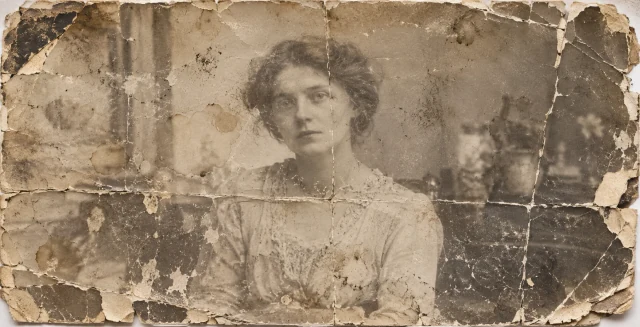
Reduce scratches, creases, stains and small damaged areas. Severely missing areas may not be accurately recovered.
Upload images in batches to remove backgrounds, restore photos and enhance images at the 4K output tier.
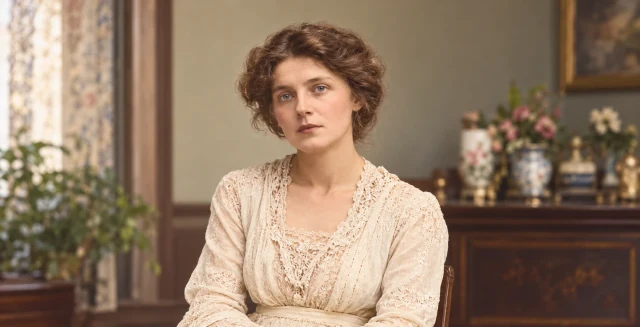
Restore scratches, creases and fading in one or more old photos, and colorize black-and-white images. Compare originals and results and download in batches.
No image selected
Review batch results one image at a time
Processing. Stay on this page to keep submitting the remaining images.
Upload one or more JPG, PNG or WebP photos. You can add more in stages. Prefer scans or clear photos without glare.
Choose 1K, 2K or 4K output and start the batch. Photos are processed one at a time; black-and-white photos are also colorized.
Select a result thumbnail to compare the original and restored photo. Check faces and damaged areas. Download individually or select several for a ZIP.
Reduce scratches, creases, stains and small damaged areas. Severely missing areas may not be accurately recovered.
Improve fading and uneven exposure to make people and scenes easier to see. Results depend on the information preserved in the original.
Restore old photos and add natural-looking colors. AI infers colors; they are not verified historical colors of clothing, skin or surroundings.
| Input formats | Static JPG, JPEG, PNG and WebP images |
|---|---|
| File size per image | 25 MB; images over 10 MB are compressed automatically when submitted |
| Result capacity | Up to 30 images; shared across tools. Submission is also limited by available credits |
| Output resolution | 1K, 2K or 4K. Actual dimensions depend on the result |
| Downloads | Individual downloads or a ZIP of selected results or results in the current filter |
Results are kept for 3 days. Download before expiry.
Delete results and associated original previews from the results list. Expired files are cleaned up periodically. Images pass through our server and third-party processing services. See the Privacy policy.
Yes. Import multiple photos and they will be processed one at a time. The number is limited by remaining result capacity and available credits.
Photo restoration currently includes natural-looking colorization of black-and-white and sepia photos. There is no separate option to preserve monochrome. AI infers the colors.
This cannot be guaranteed. Restoration aims to preserve people and composition, but blurry or severely damaged areas may change. Compare against the original.
You can try, but missing information cannot be guaranteed to recover accurately. The example shows one result and does not promise the same outcome for every photo.
Stay on this page until the batch finishes. Unsubmitted photos may be lost; submitted tasks continue. Processing records can be restored within the retention period.
Check the error, format, file size and connection, then retry as advised. Failed or timed-out tasks return credits automatically.